Automated Blogging Workflow for Next.js That Scales SEO Safely
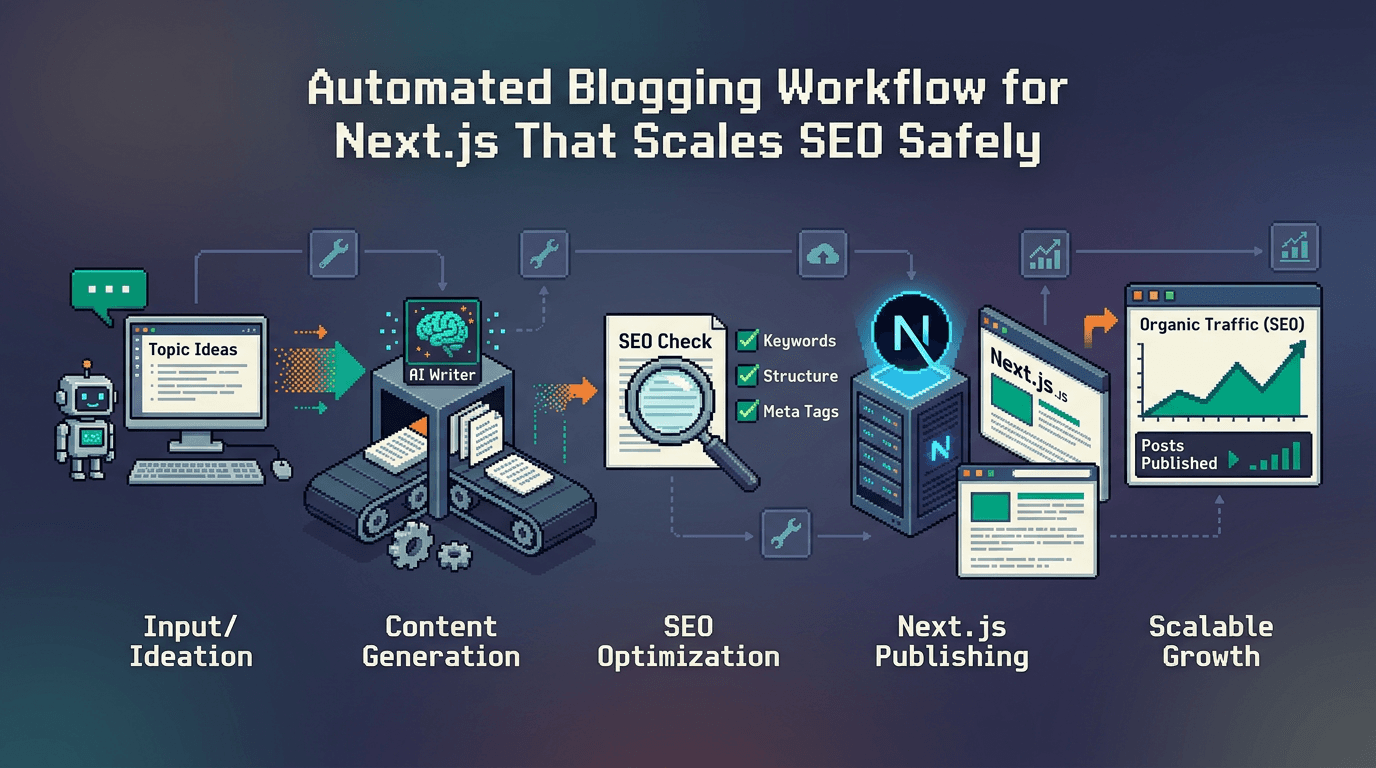
Publishing by hand does not scale. An automated blogging workflow for Next.js gives you reliable metadata, schema, sitemaps, and internal linking so every deploy ships SEO correctly without busywork.
This guide explains how to design an automated blogging workflow for Next.js, who should use it, and the exact steps to implement it. It targets developers and SaaS teams using React and SSR. Key takeaway: treat SEO and publishing as code with validations, not as manual tasks.
Why automate your Next.js blogging workflow
Automation turns fragile, manual steps into reliable, versioned code. For Next.js teams, it eliminates drift between posts, reduces release toil, and improves technical SEO.
The hidden cost of manual publishing
- Inconsistent titles, descriptions, and canonical tags across posts
- Missed sitemap updates and stale revalidation
- Duplicate content from copy pasting between environments
- Broken internal links after slugs change
- Delayed releases due to approvals in chat threads instead of code review
What an automated workflow guarantees
- Validated metadata and schema on every build
- Deterministic slugging and canonicalization rules
- Automatic sitemap generation and pinging
- Internal linking automation across related posts
- Idempotent, rollback safe publishing with an audit trail
Architecture for an automated blogging workflow in Next.js
A clean architecture separates content, rendering, and distribution so each step can be verified.
Core components
- Content source: Markdown, MDX, JSON, or a managed content layer
- Build time data: a post index with metadata, schema payloads, and link graph
- Rendering: Next.js pages using the App Router with strict SEO defaults
- Distribution: sitemaps, RSS/Atom, and search console pings
Suggested repo structure
- content/posts: source files or synced content
- lib/seo: helpers for metadata, schema, canonicals
- lib/sitemap: generators for sitemaps and feeds
- app/blog/[slug]/page.tsx: SSR page rendering with strict SEO
- scripts/publish: CI tasks for validations and publishing
Implementing Next.js metadata and schema at scale
Next.js gives you the Metadata API and file based conventions. Wrap them in utilities so every post gets consistent outputs.
Metadata with Next.js Metadata API
- Provide title, description, canonical, and open graph image from a single source of truth
- Compute robots directives by environment
- Merge site defaults with per post overrides
Schema markup for posts
- Use Article or BlogPosting schema with headline, datePublished, dateModified, author, image, and publisher
- Include BreadcrumbList for post hierarchies
- Validate JSON LD during CI using a schema validator
Automating sitemaps and revalidation
Sitemaps are often forgotten. Automate them so every merge updates discovery.
Next.js sitemap generation
- Generate sitemap.xml, sitemap index for large sites, and lastmod fields
- Include canonical URLs only, not staging or preview
- Invalidate caches or trigger ISR revalidation on publish
Ping search engines safely
- Rate limit pings in CI to avoid noisy updates
- Only send pings on sitemap content changes
- Log and alert on failures to keep observability
Internal linking automation for compounding SEO
Internal links distribute authority and help users and crawlers. Program them, do not rely on memory.
Building a link graph
- Parse titles, slugs, and keywords to create candidate link targets
- Enforce a maximum number of contextual links per section
- Respect no link rules for specific anchors or sections like legal text
Inserting links deterministically
- Add links to the first relevant mention only
- Prefer deep pages with fewer existing inbound links to balance equity
- Rebuild links when slugs or categories change
Manual vs automated workflows for Next.js
The table below contrasts manual publishing with an automated blogging workflow in areas that impact Next.js SEO and operations.
| Area | Manual workflow | Automated blogging workflow |
|---|---|---|
| Metadata consistency | Human edited, error prone | Generated and validated in CI |
| Schema markup | Rarely added or inconsistent | JSON LD emitted per post, type safe |
| Sitemaps | Updated occasionally | Generated on every publish with pings |
| Internal links | Ad hoc | Link graph with deterministic insertion |
| Approvals | Chat and checklists | Code review and status checks |
| Rollback | Manual edits | Idempotent, versioned content layer |
| Time to ship | Hours to days | Minutes with zero handoffs |
Building the pipeline step by step
This section provides practical steps to create an automated blogging workflow for Next.js using TypeScript utilities, CI, and SSR safe rendering.
Step 1: Define a post schema
- Create a Zod or TypeScript interface describing frontmatter and body fields
- Include title, description, slug, datePublished, image, tags, canonical, and summary
- Validate content during CI to block broken posts
Step 2: Create metadata utilities
- Build a function that maps post data to Next.js Metadata API fields
- Derive open graph and twitter images from a shared configuration
- Normalize canonical URLs to avoid trailing slash inconsistencies
Step 3: Emit JSON LD
- Generate BlogPosting schema with required fields and optional sections like speakable or breadcrumb
- Serialize it in a component that only renders on the server
- Test with structured data testing tools in CI
Step 4: Generate sitemaps
- Aggregate routes into a sitemap index and segmented sitemaps for posts, categories, and static pages
- Write files during build and expose via app/sitemap.xml route handlers
- Include lastmod and changefreq where relevant
Step 5: Build the internal link graph
- Index all posts and compute keyword to slug candidates
- Avoid self links, and prevent excessive repeats
- Insert links during Markdown to HTML rendering or MDX compile time
Step 6: Wire approval gates in CI
- Lint content for broken links and image alt text
- Validate metadata completeness and schema correctness
- Block merges when validations fail; require review from an approver
Step 7: Publish and revalidate
- On merge to main, update sitemaps, ping search engines when changed, and trigger ISR revalidation
- Post a summary to the team channel with new URLs and internal links added
- Record an audit event with content hash and artifact links
Using programmatic SEO with SSR apps
Programmatic SEO scales post creation and optimization while keeping quality controls. With SSR, you ship crawlable HTML plus predictable metadata.
Patterns that work for programmatic SEO
- Templated posts with parameterized sections, but human edited intros and conclusions
- Deterministic keyword to heading mapping to maintain topical coverage
- Auto generated FAQs and code samples validated for syntax
Common pitfalls and how to avoid them
- Keyword stuffing in headings: keep language natural and specific
- Thin pages from overly aggressive templates: set a minimum content length and require examples
- Orphan pages: enforce at least three inbound internal links before publish
Where React and Next.js differ for SEO
React alone renders on the client by default, while Next.js enables SSR, SSG, and ISR. SEO critical signals need server rendered HTML and predictable routes.
React SPA constraints
- Client side rendering can delay metadata and structured data
- Crawlers might miss content behind heavy hydration
- Routing and canonical management require extra setup
Next.js advantages for SEO
- App Router supports server components and stable metadata
- Route handlers for sitemaps and feeds are first class
- ISR provides a middle ground for speed and freshness
Comparison of popular tools and approaches
Below is a high level comparison to help teams choose an automated blogging workflow that fits their stack.
| Option | Best for | Strengths | Trade offs | Pricing notes |
|---|---|---|---|---|
| WordPress with plugins | Non technical teams | WYSIWYG, themes, large ecosystem | Plugin sprawl, variable schema quality | Hosting plus premium plugins |
| Headless CMS like Contentful or Sanity | Mixed teams | Structured content, APIs, roles | Custom plumbing for Next.js SEO | Usage based tiers |
| Static files in repo | Dev heavy teams | Full control, versioned content | DIY metadata, schema, and links | Infra only |
| Automation platform for Next.js blogs | Dev first SaaS teams | Programmatic SEO, metadata, schema, sitemaps, internal linking, zero touch publish | Opinionated pipeline | Subscription |
Example Next.js implementation pattern
This minimal pattern demonstrates how to compose a page that pulls a post, emits metadata, and renders JSON LD safely on the server.
Metadata utility
// lib/seo/metadata.ts
import type { Metadata } from "next";
import { site } from "~/lib/site";

export function postMetadata(post: Post): Metadata {
  const url = new URL(`/blog/${post.slug}`, site.url).toString();
  return {
    title: post.title,
    description: post.description,
    alternates: { canonical: post.canonical ?? url },
    openGraph: {
      type: "article",
      title: post.title,
      description: post.description,
      url,
      images: [{ url: post.image, width: 1200, height: 630 }],
    },
    twitter: { card: "summary_large_image", title: post.title, description: post.description, images: [post.image] },
    robots: { index: true, follow: true },
  };
}
JSON LD component
// components/JsonLd.tsx
import React from "react";

export function JsonLd({ json }: { json: object }) {
  return (
    <script
      type="application/ld+json"
      dangerouslySetInnerHTML={{ __html: JSON.stringify(json) }}
    />
  );
}
Blog page using App Router
// app/blog/[slug]/page.tsx
import { postMetadata } from "~/lib/seo/metadata";
import { JsonLd } from "~/components/JsonLd";
import { getPostBySlug, toBlogPostingJsonLd } from "~/lib/content";

export async function generateMetadata({ params }: { params: { slug: string } }) {
  const post = await getPostBySlug(params.slug);
  return postMetadata(post);
}

export default async function Page({ params }: { params: { slug: string } }) {
  const post = await getPostBySlug(params.slug);
  const jsonld = toBlogPostingJsonLd(post);
  return (
    <article>
      <h1>{post.title}</h1>
      <div dangerouslySetInnerHTML={{ __html: post.html }} />
      <JsonLd json={jsonld} />
    </article>
  );
}
CI checks that enforce SEO before publish
Guardrails in CI keep your automated blogging workflow healthy and predictable.
Recommended checks
- Frontmatter validation and slug uniqueness
- Metadata and schema presence
- Broken link and image audit
- Word count thresholds and heading structure validation
- Sitemap diff to confirm new URLs and lastmod updates
Sample CI outline
name: content-ci
on: [pull_request]
jobs:
  validate:
    runs-on: ubuntu-latest
    steps:
      - uses: actions/checkout@v4
      - uses: actions/setup-node@v4
      - run: npm ci
      - run: npm run lint:content
      - run: npm run test:seo
      - run: npm run build:sitemaps --if-present
Governance, approvals, and rollbacks
Automation without governance is risky. Add explicit approvals and reversible steps.
Approval gates
- Require at least one approver for new posts and title changes
- Block merge if canonical or robots directives change without review
- Store an audit log with content hashes and reviewer IDs
Rollback strategy
- Keep content immutable after publish; create a new revision instead of editing in place
- Rebuild sitemaps and revalidate on rollback like any other change
- Maintain redirects if slugs change to preserve equity
Fit by team size and stack
Different teams need different trade offs. Map your needs to the right approach.
Solo developer or indie SaaS
- Store Markdown in repo, add strict SEO helpers
- Use a simple link graph script and GitHub Actions for CI
- Schedule via ISR revalidation and a queue in your database
Growing SaaS team with mixed contributors
- Adopt a managed content layer with roles and approvals
- Keep Next.js rendering in your app for speed and control
- Enable automatic metadata, schema, sitemaps, and internal linking at publish time
Measuring results without vanity metrics
Focus on signals your pipeline influences rather than rankings alone.
Operational metrics
- Time from draft to publish
- Failed CI checks per post and reasons
- Reverts and rollback frequency
SEO execution metrics
- Percentage of posts with complete metadata and valid schema
- Internal links added per post and orphan rate
- Sitemap freshness and successful ping rate
Troubleshooting common issues
Automation reveals edge cases. Here is how to diagnose them quickly.
Duplicate content warnings
- Verify canonical URLs and ensure only one indexable variant per post
- Check that staging domains are set to noindex
- Audit redirects after slug changes
Missing rich results
- Validate JSON LD with testing tools; confirm required fields
- Ensure images meet size requirements and are accessible
- Avoid client only schema injection that renders after crawl
Key Takeaways
- Treat your automated blogging workflow for Next.js as code with validations.
- Use the Next.js Metadata API, JSON LD, sitemaps, and a link graph by default.
- Add CI gates to enforce SEO, broken links, and content quality before publish.
- Prefer deterministic slugs, canonicals, and idempotent releases with rollbacks.
Ship content on a cadence you can trust, with SEO that stays correct as you scale.
Frequently Asked Questions
- What is an automated blogging workflow for Next.js?
- A code driven pipeline that validates content, generates metadata and schema, updates sitemaps, inserts internal links, and publishes with approvals and rollbacks.
- Does the Next.js Metadata API replace schema markup?
- No. Metadata API covers tags like title and open graph. You still need JSON LD for structured data such as BlogPosting or Article.
- How do I avoid duplicate content when cross posting?
- Set a single canonical URL per post, ensure staging is noindex, manage redirects on slug changes, and avoid indexing mirrored copies.
- Can I automate internal linking safely?
- Yes. Build a link graph from titles, slugs, and keywords. Insert a limited number of contextual links deterministically and avoid self linking.
- What should I test in CI before publishing?
- Frontmatter shape, metadata completeness, valid JSON LD, broken links, image accessibility, heading structure, slug uniqueness, and sitemap diffs.