Programmatic SEO examples for Next.js projects
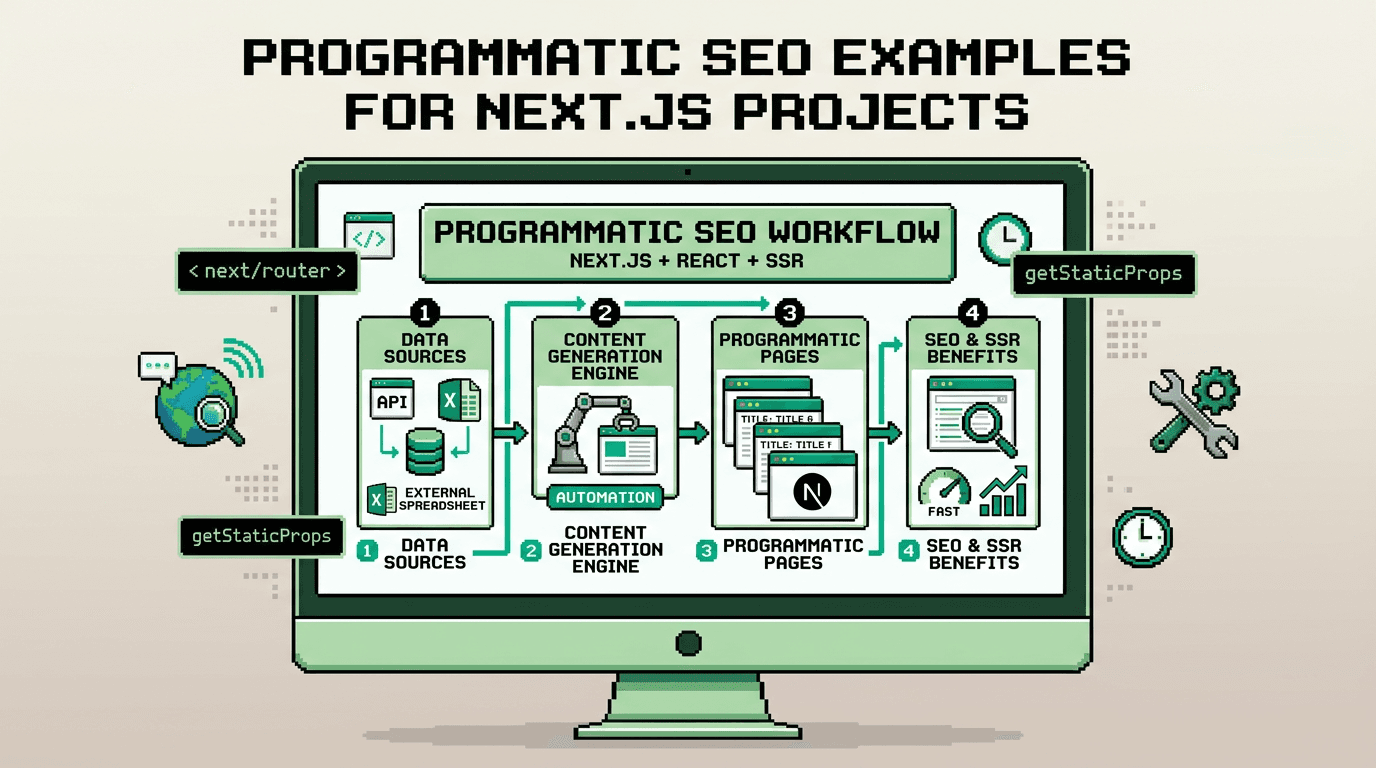
Programmatic SEO lets you ship hundreds of consistent, metadata complete pages without manual toil. In Next.js, that means code generating content, metadata, schema, and sitemaps on a reliable cadence.
This guide shows practical programmatic SEO examples for Next.js apps. It is for developers, indie hackers, and SaaS teams who want reproducible SEO at scale. The key takeaway: model your data, codify metadata and schema, automate sitemaps and internal links, then wire a zero-touch publish path.
What is programmatic SEO and why Next.js fits
Programmatic SEO is a pattern where pages are generated from structured data with consistent metadata and linking rules. Next.js fits because it provides SSR, ISR, file-based routing, and a flexible Metadata API.
Core benefits
- Consistency across thousands of pages
- Faster publishing with fewer mistakes
- Strong technical SEO foundations by default
Typical inputs and outputs
- Inputs: product catalogs, location lists, feature matrices, docs, pricing, FAQs
- Outputs: landing pages, docs, comparison pages, FAQs, changelogs, blog entries
Programmatic SEO examples in Next.js
This section walks through concrete examples developers actually ship.
Example 1: Location or vertical pages
If you serve multiple cities or industries, define a data model and map it to routes.
// lib/data/locations.ts
export type Location = { slug: string; city: string; state: string; headline: string };
export const LOCATIONS: Location[] = [
  { slug: "austin-tx", city: "Austin", state: "TX", headline: "Fast onboarding in Austin" },
  { slug: "denver-co", city: "Denver", state: "CO", headline: "Scale teams in Denver" },
];
// app/locations/[slug]/page.tsx
import { LOCATIONS } from "@/lib/data/locations";
import { notFound } from "next/navigation";
export async function generateStaticParams() {
return LOCATIONS.map(l => ({ slug: l.slug }));
}
export default function LocationPage({ params }: { params: { slug: string } }) {
const loc = LOCATIONS.find(l => l.slug === params.slug);
if (!loc) return notFound();
return (
<main>
<h2>{loc.headline}</h2>
<p>Serving {loc.city}, {loc.state}. Get a demo.</p>
{/* Include CTAs, testimonials, features scoped to location */}
</main>
);
}Example 2: Feature matrix pages
Generate feature deep-dives or comparison pages from a JSON schema.
// lib/data/features.ts
export type Feature = { slug: string; name: string; benefits: string[] };
export const FEATURES: Feature[] = [
  { slug: "internal-linking", name: "Internal linking", benefits: ["scales site structure", "reduces orphan pages"] },
  { slug: "schema", name: "Structured data", benefits: ["rich results eligibility", "clear entity signals"] },
];
// app/features/[slug]/page.tsx
import { FEATURES } from "@/lib/data/features";
import { notFound } from "next/navigation";
export async function generateStaticParams() {
return FEATURES.map(f => ({ slug: f.slug }));
}
export default function FeaturePage({ params }: { params: { slug: string } }) {
const f = FEATURES.find(x => x.slug === params.slug);
if (!f) return notFound();
return (
<article>
<h2>{f.name}</h2>
<ul>{f.benefits.map(b => <li key={b}>{b}</li>)}</ul>
</article>
);
}Example 3: Programmatic blog topics
Use a topic list to create SEO-led blog entries at scale, then backfill with content generation.
// lib/data/topics.ts
export const TOPICS = [
  { slug: "nextjs-seo-checklist", title: "Next.js SEO checklist", intent: "transactional" },
  { slug: "programmatic-seo-examples", title: "Programmatic SEO examples", intent: "informational" },
];
// app/blog/[slug]/page.tsx
import { TOPICS } from "@/lib/data/topics";
import { notFound } from "next/navigation";
export async function generateStaticParams() {
return TOPICS.map(t => ({ slug: t.slug }));
}
export default function BlogPage({ params }: { params: { slug: string } }) {
const t = TOPICS.find(x => x.slug === params.slug);
if (!t) return notFound();
return (
<article>
<h2>{t.title}</h2>
<p>Draft content for {t.title}. Expand via your pipeline.</p>
</article>
);
}Metadata patterns with the Next.js Metadata API
Good metadata is not an afterthought. Program it alongside your data models. This is central to any nextjs seo guide.
Route-level metadata generation
// app/locations/[slug]/metadata.ts
import type { Metadata } from "next";
import { LOCATIONS } from "@/lib/data/locations";

export async function generateMetadata({ params }: { params: { slug: string } }): Promise<Metadata> {
  const loc = LOCATIONS.find(l => l.slug === params.slug);
  if (!loc) return {};
  const title = `${loc.city} ${loc.state} SaaS onboarding`;
  const description = `Onboard teams in ${loc.city}, ${loc.state} with consistent SEO and content automation.`;
  const url = `https://example.com/locations/${loc.slug}`;
  return {
    title,
    description,
    alternates: { canonical: url },
    openGraph: {
      title,
      description,
      url,
      type: "article",
    },
    twitter: { card: "summary_large_image", title, description },
  };
}
Centralized defaults and per-type overrides
// app/metadata.ts
import type { Metadata } from "next";
export const metadata: Metadata = {
  metadataBase: new URL("https://example.com"),
  title: { default: "Example SaaS", template: "%s | Example SaaS" },
  robots: { index: true, follow: true },
};
Schema markup that scales
Structured data clarifies meaning for search engines. Generate it in lockstep with your pages.
JSON-LD helpers
// lib/seo/schema.ts
export function articleSchema({ url, title, description, date, author }: {
  url: string; title: string; description: string; date: string; author: string;
}) {
  return {
    "@context": "https://schema.org",
    "@type": "Article",
    headline: title,
    description,
    datePublished: date,
    author: { "@type": "Person", name: author },
    mainEntityOfPage: { "@type": "WebPage", "@id": url },
  };
}
// app/blog/[slug]/head.tsx
import Script from "next/script";
import { articleSchema } from "@/lib/seo/schema";
import { TOPICS } from "@/lib/data/topics";
export default function Head({ params }: { params: { slug: string } }) {
const t = TOPICS.find(x => x.slug === params.slug);
if (!t) return null;
const url = `https://example.com/blog/${t.slug}`;
const json = articleSchema({ url, title: t.title, description: `${t.title} explained`, date: new Date().toISOString(), author: "Team" });
return (
<>
<Script id="ld-article" type="application/ld+json" dangerouslySetInnerHTML={{ __html: JSON.stringify(json) }} />
</>
);
}Common schema types for programmatic pages
- Article or BlogPosting for posts
- Product for catalog and pricing
- FAQPage for Q and A sections
- Organization and BreadcrumbList sitewide
Sitemap generation and ISR
A reliable sitemap keeps search engines aware of your inventory. Generate it from the same data sources and support incremental updates.
Route-aware sitemap
// app/sitemap.ts
import { LOCATIONS } from "@/lib/data/locations";
import { FEATURES } from "@/lib/data/features";

export default async function sitemap() {
  const base = "https://example.com";
  const staticRoutes = ["", "/blog", "/features"].map(p => ({ url: `${base}${p}`, lastModified: new Date() }));
  const locationRoutes = LOCATIONS.map(l => ({ url: `${base}/locations/${l.slug}`, lastModified: new Date() }));
  const featureRoutes = FEATURES.map(f => ({ url: `${base}/features/${f.slug}`, lastModified: new Date() }));
  return [...staticRoutes, ...locationRoutes, ...featureRoutes];
}
Revalidation strategy
- Use ISR for high count collections
- Revalidate on webhooks when data changes
- Keep a small TTL and push revalidate on important edits
// app/locations/[slug]/page.tsx
export const revalidate = 3600; // seconds
Internal linking automation
Internal links spread PageRank and help discovery. Program them so new pages are never orphaned.
Link rules from data models
// lib/seo/links.ts
export function relatedLocations(currentSlug: string, all: { slug: string }[], max = 3) {
  return all.filter(x => x.slug !== currentSlug).slice(0, max);
}
// app/locations/[slug]/page.tsx
import Link from "next/link";
import { relatedLocations } from "@/lib/seo/links";
import { LOCATIONS } from "@/lib/data/locations";
const related = relatedLocations(params.slug, LOCATIONS);
<ul>
{related.map(r => (
<li key={r.slug}><Link href={`/locations/${r.slug}`}>{r.slug}</Link></li>
))}
</ul>Sitewide modules
- Related items widgets on post and product pages
- Paginated indices per category or tag
- Footer nav seeded by your top clusters
Putting it together as a pipeline
The real payoff comes when content, metadata, schema, sitemaps, and links roll out as one predictable pipeline.
Minimal pipeline steps
1) Define data sources and schemas
2) Map routes with generateStaticParams
3) Implement generateMetadata with canonical logic
4) Emit JSON-LD via helpers
5) Build sitemap.ts from the same datasets
6) Add link widgets and indices
7) Configure ISR and webhooks for updates
Example connection diagram
- Source data: DB or JSON
- Build: Next.js app router
- Outputs: pages, metadata, schema, sitemap
- Delivery: ISR with webhook revalidation
Comparing common approaches
Here is a quick comparison of three realistic approaches to programmatic SEO in a React stack.
| Approach | Setup effort | Control | SEO safety | Scale | Best for |
|---|---|---|---|---|---|
| Hand-coded Next.js only | Medium | High | High if disciplined | Medium | Small to mid catalogs |
| Headless CMS + Next.js | Higher | High | High with validations | High | Teams with editors |
| Automation SDK + Next.js | Low | High | High with built-in rules | High | Dev-first SaaS shipping weekly |
Production tips and common pitfalls
Tips
- Canonical URLs must be deterministic per route
- Keep metadata templates terse and unique
- Generate OG images programmatically where possible
- Validate schema in CI with a JSON-LD linter
Pitfalls
- Duplicate content across similar pages without canonicals
- Orphan pages due to missing related modules
- Stale sitemaps that omit new routes
- Missing noindex on low value test routes
How AutoBlogWriter fits a Next.js workflow
AutoBlogWriter is a developer-first automation layer for Next.js and SSR apps. It generates production-ready posts with built-in metadata, schema, sitemap entries, and internal linking.
SDK example
// app/blog/[slug]/page.tsx
import { fetchBlogPost, generatePostMetadata } from "@autoblogwriter/sdk";
import { BlogPost } from "@autoblogwriter/sdk/react";

export async function generateMetadata({ params }: { params: { slug: string } }) {
  return generatePostMetadata(params.slug);
}

export default async function Page({ params }: { params: { slug: string } }) {
  const post = await fetchBlogPost(params.slug);
  return <BlogPost post={post} />;
}
Why it helps
- Zero-touch draft to publish runs with deterministic outputs
- Automatic schema and sitemap generation
- Internal linking automation so new pages get discovered
- Works with ISR and webhooks for reliable updates
Key Takeaways
- Programmatic SEO in Next.js starts with structured data and consistent route mapping.
- Generate metadata, schema, sitemaps, and links from the same sources to avoid drift.
- Use ISR plus webhooks to keep pages fresh without full rebuilds.
- Automate internal linking to prevent orphan pages and improve crawlability.
- Consider an SDK like AutoBlogWriter to enforce the pipeline end to end.
Ship your first programmatic section small, validate templates and schema, then scale the pattern across your app.
Frequently Asked Questions
- What is programmatic SEO in Next.js?
- Generating pages from structured data with consistent metadata, schema, sitemaps, and internal links using Next.js routing and APIs.
- How do I avoid duplicate content at scale?
- Use canonical URLs in generateMetadata, deduplicate slugs, and ensure one primary URL per intent. Avoid thin near-duplicates.
- Should I use ISR for programmatic pages?
- Yes. Pair ISR with webhook-triggered revalidation so updates propagate quickly without full rebuilds.
- Which schema types are most useful?
- Article or BlogPosting for posts, Product for catalogs, FAQPage for Q and A, Organization and BreadcrumbList sitewide.
- How does AutoBlogWriter help developers?
- It automates generation of posts, metadata, schema, sitemaps, and internal linking with a Next.js friendly SDK and zero-touch runs.