How to Build an AI Blog Automation Pipeline for Next.js
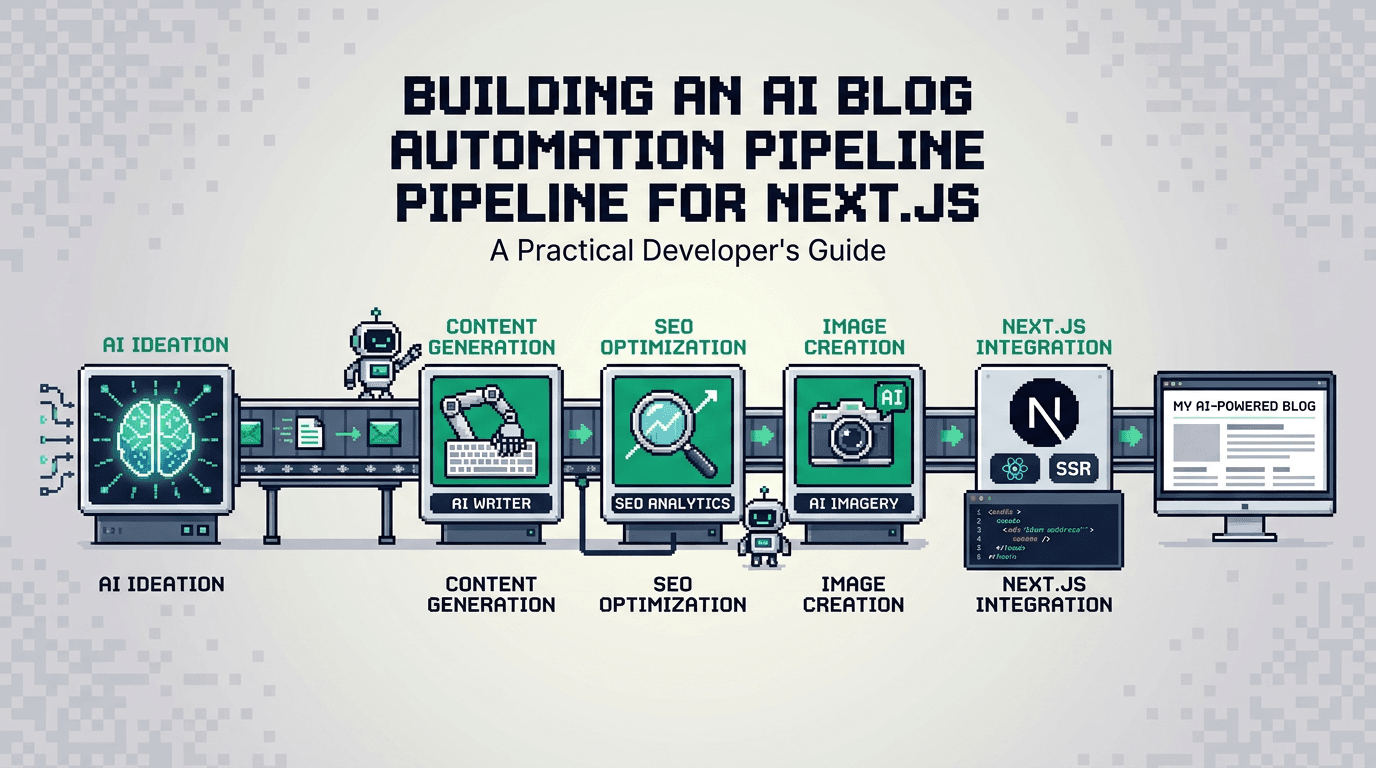
AI blog automation removes repetitive publishing work so you can focus on product and docs. With the right pipeline, your Next.js blog ships consistent, SEO ready posts on a predictable cadence.
This guide shows developers how to design and implement an AI blog automation pipeline in Next.js. It is for React and SSR teams who want programmatic SEO, automated metadata and sitemap generation, and reliable publishing. The key takeaway: treat content as code with a governed pipeline that validates SEO before anything goes live.
What AI Blog Automation Means for Next.js Teams
AI blog automation is not only text generation. It is a controlled workflow that converts source prompts or specs into production ready posts with metadata, schema, internal links, images, and a publish schedule.
Common problems it solves
- Manual metadata and schema drift across posts
- Missed publishing windows and inconsistent cadence
- Duplicate content or weak internal links at scale
- Developer overhead building and maintaining a custom CMS
Outcomes you can expect
- Consistent SEO signals per post with validated metadata
- Predictable release cadence via queues and approvals
- Source controlled content that is reviewable and testable
- Lower maintenance through a focused SDK and components
Architecture Overview of an Automated Blogging Workflow
A robust pipeline breaks down into stages and clearly defined responsibilities.
Reference architecture
- Input: brief, outline, or templated spec in Markdown or JSON
- Generation: AI assisted drafting with deterministic structure
- Validation: lints for metadata, schema, links, and images
- Storage: content repository or managed content layer
- Publish: queue with approval gates, idempotent writes
- Render: Next.js routes with SSR/ISR and schema injection
- Index: sitemap update and revalidation webhooks
Tooling and services
- Next.js app with App Router and MDX support
- Content storage in Git, a headless store, or a managed layer
- An SEO validator that enforces metadata and schema
- A publisher that schedules and triggers revalidation
- Optional connectors for WordPress or Shopify when cross posting
For a developer first, SSR oriented option that bundles generation, metadata, schema, sitemaps, and internal linking, see AutoBlogWriter at https://autoblogwriter.app/.
Programmatic SEO Fundamentals for Next.js
Programmatic SEO scales consistent on page signals across many pages.
Standardize your metadata
Define a single metadata source of truth per post:
- title, description, slug, and canonical URL
- open graph and Twitter images
- article dates and authors
In Next.js, prefer the Metadata API for consistency. See the official docs: https://nextjs.org/docs/app/api-reference/functions/generate-metadata
Structured data and sitemaps
Add schema.org Article markup and keep your sitemap current.
- Generate Article and BreadcrumbList JSON LD
- Update sitemap.xml whenever a post publishes
- Submit updated sitemaps through Search Console
Next.js provides a simple pattern for sitemaps: https://nextjs.org/docs/app/api-reference/file-conventions/route-segment-config#sitemap
Implementing the Pipeline in Next.js
This section walks through the practical setup using routes, server functions, and a content layer.
Content model and types
Create a core Post type used everywhere.
// types/post.ts
export type Seo = {
  title: string;
  description: string;
  canonical: string;
  ogImage?: string;
  twitterImage?: string;
};

export type Post = {
  slug: string;
  mdx: string; // compiled or raw
  seo: Seo;
  tags: string[];
  publishedAt: string; // ISO
  updatedAt?: string; // ISO
  status: 'draft' | 'scheduled' | 'published';
};
Route structure and rendering
Use App Router with a dynamic segment for posts.
// app/blog/[slug]/page.tsx
import { fetchPostBySlug } from '@/lib/content';
import { notFound } from 'next/navigation';
import { MDXRemote } from 'next-mdx-remote/rsc';

export default async function PostPage({ params }: { params: { slug: string } }) {
  const post = await fetchPostBySlug(params.slug);
  if (!post) return notFound();
  return <article className="prose"><MDXRemote source={post.mdx} /></article>;
}
Metadata generation
Centralize metadata so every post complies.
// app/blog/[slug]/head.tsx or generateMetadata in App Router
import { fetchPostBySlug } from '@/lib/content';
import type { Metadata } from 'next';

export async function generateMetadata({ params }: { params: { slug: string } }): Promise<Metadata> {
  const post = await fetchPostBySlug(params.slug);
  if (!post) return {};
  const { title, description, canonical, ogImage, twitterImage } = post.seo;
  return {
    title,
    description,
    alternates: { canonical },
    openGraph: { title, description, images: ogImage ? [ogImage] : [] },
    twitter: { card: 'summary_large_image', title, description, images: twitterImage ? [twitterImage] : [] },
  };
}
Schema injection
Emit JSON LD for Article and Breadcrumbs on the page.
// app/blog/[slug]/Schema.tsx
export function ArticleSchema({ post }: { post: any }) {
  const data = {
    '@context': 'https://schema.org',
    '@type': 'Article',
    headline: post.seo.title,
    description: post.seo.description,
    datePublished: post.publishedAt,
    dateModified: post.updatedAt ?? post.publishedAt,
    mainEntityOfPage: post.seo.canonical,
  };
  return <script type="application/ld+json" dangerouslySetInnerHTML={{ __html: JSON.stringify(data) }} />;
}
Building the AI Generation and Validation Stages
Quality comes from strong constraints, not from a single prompt. Split the stage into deterministic steps.
Deterministic content specification
Define a strict spec for what a post must include:
- hook paragraph and opening summary
- 5 to 8 H2 sections with optional H3s
- final H2 summary section with bullet points
- code examples and at least one table where relevant
- required keywords and internal links
Validation checks
Run validations before merge or publish:
- required sections and heading structure
- slug uniqueness and canonical format
- metadata length limits and image presence
- schema required fields
- broken links, missing alt text, internal link density
These checks can be implemented as Node scripts, GitHub Actions, or a managed content validator.
Example validation script sketch
// scripts/validate-post.ts
import { readFileSync } from 'node:fs';

const MAX_TITLE = 60;
const MAX_DESC = 160;

function validate(seo: any, body: string) {
  const errors: string[] = [];
  if (!seo.title || seo.title.length > MAX_TITLE) errors.push('Bad title length');
  if (!seo.description || seo.description.length > MAX_DESC) errors.push('Bad description length');
  if (!/^https?:\/\//.test(seo.canonical)) errors.push('Canonical must be absolute');
  if (!body.includes('## ')) errors.push('Missing H2 sections');
  return errors;
}

const post = JSON.parse(readFileSync(process.argv[2], 'utf8'));
const errs = validate(post.seo, post.mdx);
if (errs.length) {
  console.error(errs.join('\n'));
  process.exit(1);
}
Scheduling, Publishing, and Revalidation
Publishing should be predictable and reversible.
Queue and approvals
- Maintain a publish queue with scheduled timestamps
- Enforce an approval status before enqueueing
- Use idempotent operations so retries do not double publish
Next.js revalidation
When a post publishes, revalidate the affected routes.
- Call revalidatePath('/blog') and revalidatePath(
/blog/${slug}) - Update your sitemap endpoint or static file
- Ping Search Console sitemaps endpoint after batch publishes
Learn more about route revalidation: https://nextjs.org/docs/app/building-your-application/data-fetching/fetching#revalidating-data
Internal Linking and Cross Posting Strategy
Internal links distribute authority and help discovery. Cross posting expands reach but must be SEO safe.
Internal linking automation
- Maintain a graph of slugs and preferred anchor texts
- Insert 3 to 6 contextual links per post
- Avoid linking the same anchor to multiple destinations
SEO safe cross posting
If you publish to WordPress or Shopify as well:
- Use a canonical pointing to the original source
- Keep slugs consistent where possible
- Sync updatedAt and republish when content changes
Useful references:
- Canonical tags guide: https://developers.google.com/search/docs/crawling-indexing/consolidate-duplicate-urls
- Shopify blogs API: https://shopify.dev/docs/api/admin-rest/latest/resources/blog
- WordPress REST API: https://developer.wordpress.org/rest-api/
Example: Wiring a Managed Automation Tool
You can build every layer yourself, or adopt a managed system that enforces the rules and exposes an SDK.
What to expect from a managed tool
- AI assisted drafts with deterministic structure
- Built in metadata and schema generation
- Automatic sitemap updates and internal linking
- Zero touch validate, schedule, publish workflow
- Drop in React components for list and post pages
Next.js integration sketch
// app/blog/[slug]/page.tsx
import { fetchBlogPost, generatePostMetadata } from '@autoblogwriter/sdk';
import { BlogPost } from '@autoblogwriter/sdk/react';

export async function generateMetadata({ params }: { params: { slug: string } }) {
  return generatePostMetadata(params.slug);
}

export default async function Page({ params }: { params: { slug: string } }) {
  const post = await fetchBlogPost(params.slug);
  return <BlogPost post={post} />;
}
Explore AutoBlogWriter for an SSR first, developer focused approach: https://autoblogwriter.app/
Testing, Monitoring, and Governance
Treat the pipeline like production software.
Pre publish testing
- Unit test your validators and renderers
- Visual regression on code blocks and tables
- Accessibility checks for images and headings
Post publish monitoring
- Track sitemap freshness and index coverage
- Watch for broken internal links as content grows
- Alert on publish failures or missed schedules
Tooling Comparison: Build vs Buy
Use this quick comparison to decide whether to assemble components or adopt a platform.
| Approach | Setup time | SEO enforcement | Scheduling | Maintenance | Best for |
|---|---|---|---|---|---|
| Build yourself | High | Custom to implement | Custom queue | Ongoing | Teams with unique constraints |
| Managed platform | Low | Built in validators | Built in scheduler | Minimal | Teams prioritizing speed and consistency |
Cost and Effort Estimate by Stage
This rough matrix helps ballpark the effort for a typical Next.js stack.
| Stage | DIY effort | Notes |
|---|---|---|
| Generation | Medium | Prompt templates, style tuning, guardrails |
| Validation | Medium | Metadata, schema, link checks, images |
| Storage | Low | Git based or headless store |
| Rendering | Low | App Router, MDX, schema injection |
| Scheduling | Medium | Queue, approvals, retries, revalidate |
| Indexing | Low | Sitemaps and pings |
Key Takeaways
What if an image fails to generate?
- Define a strict post spec and validate it automatically
- Centralize metadata and schema using Next.js APIs
- Use a queue with approvals and idempotent publishes
- Automate internal linking and safe cross posting
- Monitor revalidation, sitemaps, and link health
A small investment in a governed pipeline turns AI writing into reliable, SEO ready publishing for your Next.js app.
Frequently Asked Questions
- What is AI blog automation for Next.js?
- A governed pipeline that generates, validates, schedules, and publishes posts with metadata, schema, sitemaps, and internal links in a Next.js app.
- Do I need a CMS to automate my blog?
- No. You can store content in Git or a managed layer and render with Next.js components, as long as validation and scheduling are enforced.
- How do I handle sitemaps in an automated workflow?
- Generate or update a sitemap on publish, serve it in Next.js, and notify Search Console after batch publishes.
- Is cross posting to WordPress or Shopify safe for SEO?
- Yes, if you use canonicals to the primary URL, keep slugs consistent, and sync updates across platforms.